

I bought the QA403 for the least romantic reason imaginable: I was tired of arguing with myself. Every amplifier I built or serviced, every phono stage I “improved,” every op-amp I swapped — all of it lived in the fog of subjective certainty. A real analyzer ends that argument. It doesn’t care what capacitors you like. It just prints the number.

What surprised me is how quickly it stopped feeling like a purchase and started feeling like plumbing. It sits under my scope, always plugged in, and I use it the way I use a multimeter. That’s the highest compliment I can pay a piece of test gear.
First impressions, and the BNC situation
It’s a small brick — roughly 177 x 44 x 97 mm and under half a kilo — in a plain extruded case with four BNCs on the front and a USB Type-B on the back. That’s it. No display, no knobs, no menu system, no firmware update ritual involving a paperclip and a prayer.
The BNCs deserve a paragraph of their own, because they are the first thing everyone complains about and the last thing you’ll think about. There are no XLRs. Left and Right each get two BNCs, and differential operation is achieved by using both. My first reaction was mild outrage; my current reaction is that a twelve-dollar bag of BNC-to-XLR and BNC-to-RCA adapters solved the problem permanently. BNC is the right choice electrically — 50-ohm-grade connectors with excellent shield continuity and no pin-1 ambiguity — even if it does mean your bench looks less like a studio and more like an RF lab. I’ve made peace with it. My adapter drawer has not.
The topology, which is the actually interesting part
This is where the QA403 earns its money, and where a lot of USB interfaces pressed into analyzer service quietly fall apart.
Start at the input. Each channel presents a genuinely differential front end with roughly 100 kΩ single-ended and 200 kΩ balanced input impedance — high enough that you’re not loading the device under test in any meaningful way. Ahead of the input buffer sits a digitally controlled resistive attenuator ladder, giving eight input ranges spanning 0 dBV to about +42 dBV of attenuation in 6 dB steps. Maximum input is around +32 dBV, which is 40 Vrms — call it 200 watts into 8 ohms — plus tolerance for a fair bit of DC on top.
That matters more than the spec sheet lets on. Putting the attenuator before the buffer is the difference between an instrument you can hang directly on a power amplifier’s output terminals and one that needs a box of external pads, each with its own tolerance stack, stray capacitance, and opportunity to lie to you about high-frequency response. I have measured a 100-watt amp at clipping with nothing between it and the analyzer but a pair of test leads. The relief is hard to overstate.
There is a trade, and it’s honest physics rather than a design flaw: the upper attenuation ranges raise the referred noise floor, since you’re discarding signal before any gain happens. On the most sensitive range with the inputs shorted, the noise floor sits around -115 dBV, which is superb. Up on the high-attenuation ranges you give some of that back. So you learn — quickly — to pick the lowest range your signal will survive, and you develop a Pavlovian twitch toward the range selector. There’s no autoranging, which means the first time you hit an over-range you’ll see it in the FFT as a wall of hash and feel briefly stupid. You’ll do this twice, maybe three times, then never again.
On the output side, the generator is a two-oscillator affair: GEN1 and GEN2 are summed digitally, and a multiplexer picks the source feeding the DAC — sine, dual-tone, multitone, white noise, or a swept chirp. After conversion, a coarse level attenuator provides four output ranges in 10 dB steps from about -12 to +18 dBV, and a differential line driver presents roughly 100 Ω single-ended, 200 Ω balanced. Full scale is +18 dBV single-ended and +24 dBV balanced, or about 12 Vrms differential, which is enough to drive most anything short of a power amp input that expects studio levels.
Converters are current-generation ESS parts running 32-bit at 48, 96, or 192 kSPS. QuantAsylum designed the board and the firmware in-house rather than gluing a reference design to a USB bridge, and you can hear the difference in the noise floor — or rather, you can’t, which is the point.
The design decision I appreciate most is the one you can’t see: galvanic isolation between the analyzer’s analog ground (which is bonded to the BNC shells) and the USB ground shared with your PC. Anyone who has tried to measure a -110 dB noise floor while a laptop switching supply injects its opinion into the chassis knows exactly why this matters. Ground loops are the number one reason cheap measurement setups produce beautiful, confident, completely fictional results. The QA403 simply refuses to participate. My mains hum, when I see it, is now genuinely in the device under test — which is a more useful and more annoying kind of truth.
The numbers, briefly
I’ll keep this short, because spec-sheet recitation is how audio writing goes to die.
- Loopback THD lands around -115 dB, with THD+N near -105 dB — roughly 0.0002% and 0.0006% respectively.
- Dynamic range is in the 116-120 dB neighborhood depending on range.
- Output noise floor with generators off is down around -124 dBV.
- Input noise floor is about -115 dBV on the 0 dBV range with shorted inputs.
- Sample rates of 48, 96, and 192 kSPS, 32-bit throughout.
- USB bus powered, drawing close to an amp — more on that shortly.
Practically, this means the analyzer’s own distortion is 20 to 30 dB below anything I build or serviced, which is exactly where you want your instrument to sit. If you are servicing a genuinely state-of-the-art low-distortion electronics — the sub-0.0001% crowd — you’ll want the optional notch filter accessory to push the residual down further.
The software, and other opinions the designer had
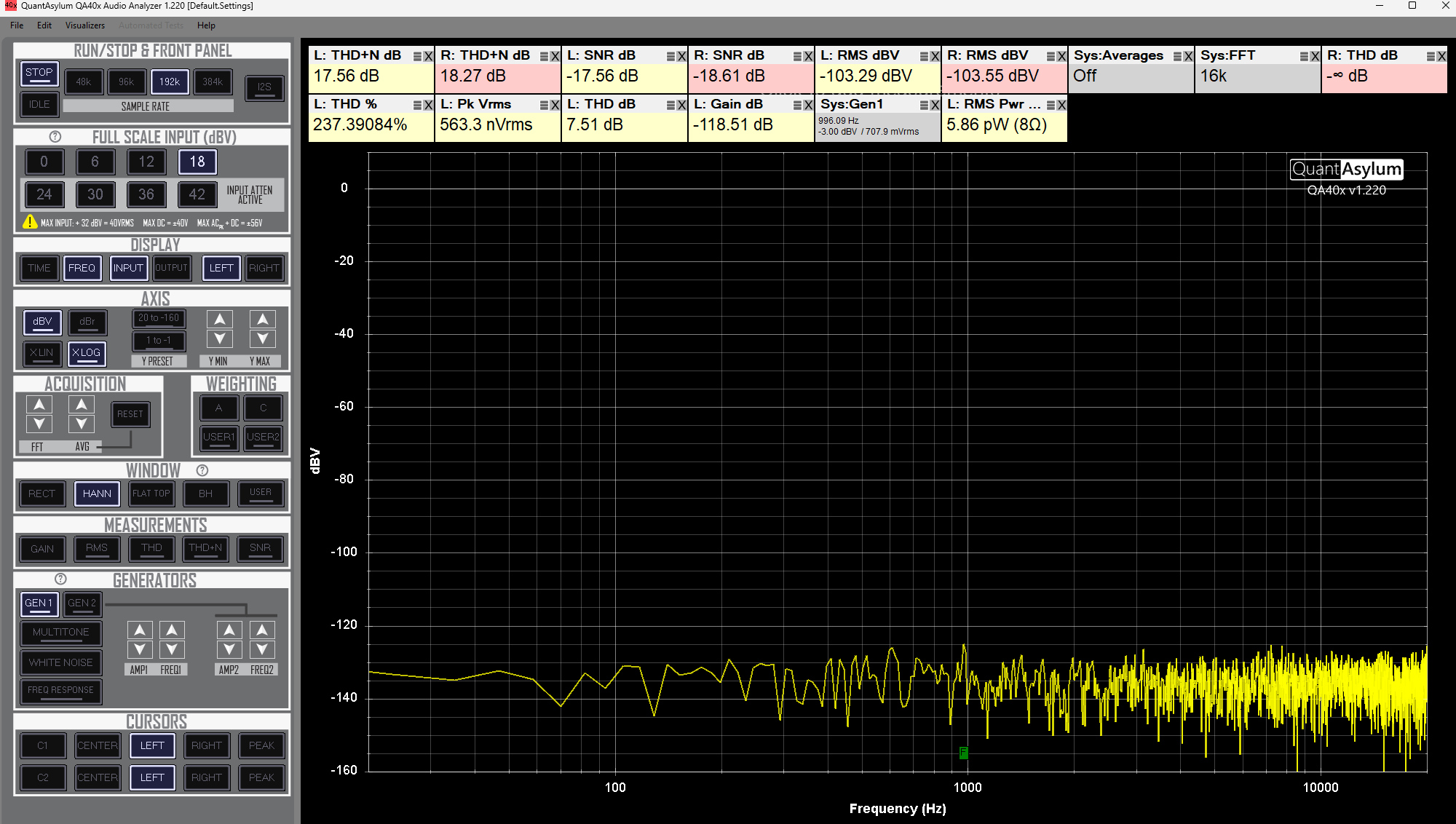
The application is a Windows program under 10 MB that installs in about the time it takes to read this sentence, needs no license server, and will run happily off a thumb drive. In an era where a graphics driver is 800 MB, this feels like a small act of civil disobedience.
It looks like it was designed by an engineer, because it was: no onboarding, no tour, no gradient. You get an FFT display with selectable windows, THD/THD+N/SNR/gain readouts, A and C weighting, a THD bargraph, harmonic residual views, and — the feature I use most — automated sweeps that produce THD versus frequency, THD versus level, or frequency response versus level in seconds rather than in the twenty minutes of manual point-plotting my previous life required.
The gripes are real but modest. No autoranging. No trace freeze or overlay for A/B comparison, which means screenshots and a folder full of PNGs. Signal generation is limited to the audio-analysis staples — no square, triangle, or pulse, so if you want a slew-rate test you’ll need a function generator on the bench beside it. And it’s Windows-only in practice; virtual machine users report varying degrees of adventure.
And then there’s QA40xPlot, which changed the calculus
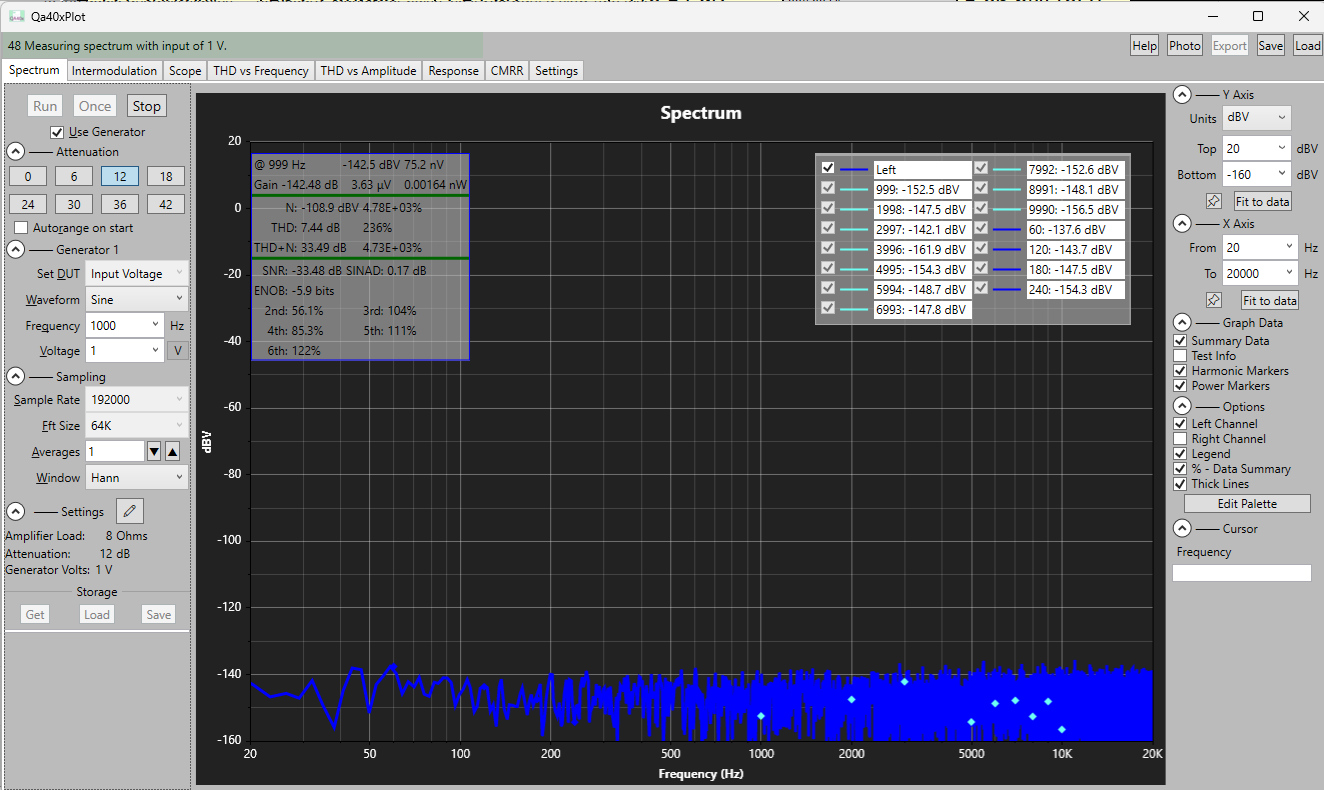
Everything above describes the stock application. What I did not expect is that the most interesting software for this hardware would arrive from outside QuantAsylum entirely.
QA40xPlot is a free, open-source (MIT) Windows front end for the QA40x family — C# and .NET 9, a proper native GUI — that talks to the analyzer over the REST interface or directly via USB. It began as a fork of an earlier community project and has sprinted well past it, at a release cadence that makes commercial instrument vendors look geological. It’s now deep into the 1.4.x series with full balanced-mode support.
The important part is what it measures. Instead of one FFT screen with sweeps bolted on, you get purpose-built test types, each on its own tab:
- Spectrum and intermodulation distortion, with real autoranging.
- THD versus frequency and THD versus amplitude sweeps.
- Frequency response, plus a proper Bode sweep with gain and phase.
- Impedance versus frequency, magnitude and phase, with cursors that will hand you the equivalent inductance or capacitance.
- Crosstalk, and a time-domain scope view for when you need to see the waveform rather than its spectrum.
USB Reqirements
One genuinely practical warning: it wants close to an amp of current from USB. Plug it into an unpowered hub or a laptop port that has opinions about current budgets and you’ll get flaky enumeration and mysterious behavior. Give it a good cable and a powered hub. I lost an evening to this so you don’t have to.
A word about the people behind it
I don’t usually write about customer service, because it’s usually a story about hold music. This one isn’t. Every question I’ve sent QuantAsylum has come back fast and from someone who clearly understands the instrument rather than a script. And when I had a genuine problem with my unit — a problem that was, in the interest of full disclosure, entirely my own fault — they sorted it out in a way I can only describe as exemplary. No blame, no interrogation, no warranty lawyering. Just a fix. For a small company selling a $600 instrument, that level of support is not something I take for granted, and it’s a real part of what you’re buying.
Final verdict
At about $600, the QA403 occupies a position that shouldn’t exist: it delivers roughly 95% of what a $30,000 Audio Precision gives you for the work most of us actually do, in a box the size of a paperback, with no license key and no annual maintenance contract. It’s not an APx555 — the generator is measurably a notch behind, there’s no autoranging, no analog I/O beyond the four BNCs, and the software will never win a design award. But those are the compromises of a tool that costs less than a decent set of monitors.
Buy it if you design, build, modify, or repair audio electronics and you’re tired of guessing. It will make you a better engineer, mostly by proving you wrong about three or four things you were certain of. Skip it if you need XLR I/O without adapters, work on a Mac and refuse to run Windows, or are chasing residuals below -120 dB without the notch accessory.
For me it’s the highest value-per-dollar instrument on the bench, and the only one that regularly hurts my feelings. Both of those are recommendations.